

WhatsApp marketing for real estate in the UAE helps agents, agencies, and developers manage property inquiries, qualify potential buyers and tenants, share listings, and arrange viewings. Instead of handling every message separately, teams can use WhatsApp to keep conversations organized from the first inquiry to the next sales step.
With the right setup, automation can handle initial replies, basic questions, lead assignment, and appointment reminders. Agents take over when someone needs property advice, wants to negotiate, or has a more complicated question. A customer relationship management (CRM) system can also keep track of property preferences, assigned agents, and follow-up tasks.
Say someone asks about a two-bedroom apartment in Abu Dhabi. The team should know which property they’re interested in, what their budget is, and whether they’ve already spoken to an agent. That way, the buyer doesn’t have to explain everything again.
This guide covers how to set up that process, use WhatsApp automation, follow up with property leads, and manage messaging responsibly in the UAE.
What Is WhatsApp Marketing for Real Estate?
WhatsApp marketing for real estate means using WhatsApp to communicate with potential buyers, tenants, and investors throughout their property search.
That includes answering listing questions, sending brochures or floor plans, recommending suitable properties, arranging viewings, and checking in with interested leads.
For an individual agent, the WhatsApp Business app may be enough. It offers features such as quick replies and chat labels to help manage daily conversations.
Larger agencies and developers may need the WhatsApp Business Platform, especially when several agents handle incoming inquiries or the business wants to connect WhatsApp with a CRM.
The difference comes down to how much of the process needs to be organized or automated.
A solo agent might handle messages manually. Meanwhile, an agency receiving leads from several projects may need a system that records the original property inquiry, asks basic questions, assigns an agent, and tracks the next action.
For businesses looking to organize these conversations, our WhatsApp marketing services page explains the available support.
How WhatsApp Fits Into the UAE Real Estate Lead Journey
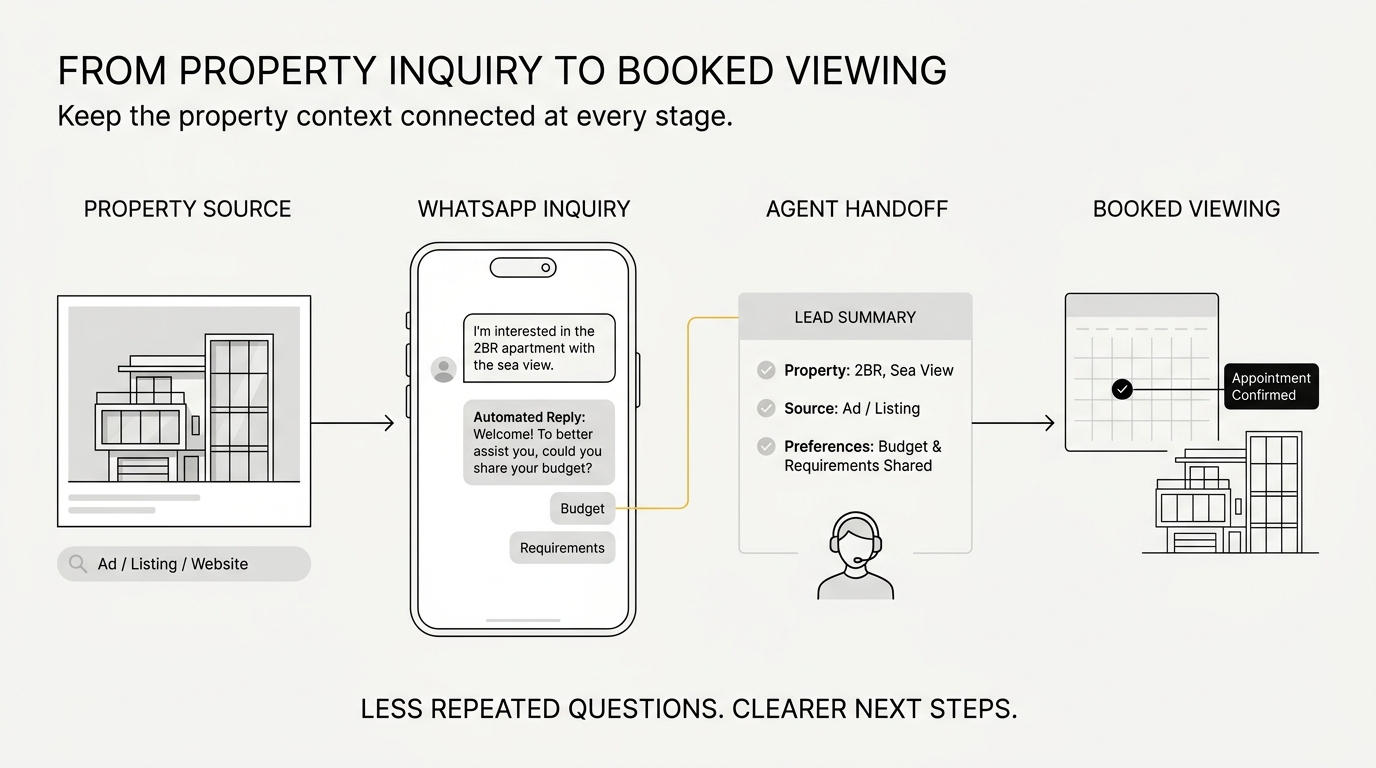
A property inquiry rarely ends with the first message. Someone may ask about the price, compare a few apartments, discuss payment options, and then arrange a viewing.
WhatsApp helps keep those steps connected, especially when the sales team can see what has already been discussed.
A typical journey looks like this:
Ad / Listing / Website → WhatsApp Inquiry → Capture Details → Qualify Lead → Share Properties → Assign Agent → Book Viewing → Follow Up
| Stage | What the buyer needs | WhatsApp action | Who handles it | Next step |
|---|---|---|---|---|
| Inquiry | Details about a listing | Confirm the inquiry and property | Automation or agent | Start the chat |
| Qualification | Suitable options | Ask about budget, area, and timing | Automation or agent | Understand the need |
| Property details | Information to compare | Share current photos, plans, or brochures | Agent or approved workflow | Shortlist properties |
| Agent handoff | Personal guidance | Pass the lead details to the right agent | Routing workflow | Speak with an agent |
| Viewing | A chance to see the property | Arrange and confirm an appointment | Agent, with reminders | Attend the viewing |
| Follow-up | Answers and next steps | Record feedback and agree on the next action | Agent | Continue or close |
Consider someone who clicks an ad for an apartment on Yas Island. After asking a few questions, the business assigns the lead to an agent.
If the system has captured the property reference and earlier answers, the agent can pick up where the conversation left off. They already know which apartment the buyer asked about and can focus on the details that are still missing.
Without that context, even a quick automated reply doesn’t help much. The agent still has to start over.
How Real Estate Leads Enter the WhatsApp Workflow
Property leads can come from Facebook and Instagram ads, website buttons, property portals, social media profiles, QR codes, and offline events.
Each source works a little differently. Still, the main goal is the same: keep enough information about the original inquiry so the sales team knows what to respond to.
Click-to-WhatsApp Ads
Facebook and Instagram Click-to-WhatsApp Ads allow people to open a WhatsApp conversation directly from an advertisement.
For real estate campaigns, this gives interested buyers a way to ask about the property they’ve just seen.
Imagine a developer promoting apartments in Abu Dhabi. The first message could say:
Thanks for your interest in our Abu Dhabi apartments. Would you like the floor plans or a call with our property team?
The buyer gets two clear options and can continue the conversation without searching for contact details.
When your tools support it, save the campaign or property reference in the CRM as well. Not every integration transfers the same information, so check which details are actually available before building the workflow around them.
For more on attracting buyers through social campaigns, see our guide to social media marketing for real estate in Abu Dhabi.
Website and Landing Page Enquiries
Adding a WhatsApp button to a property page gives visitors another way to ask questions without filling out a form.
A pre-filled message can make the conversation more useful from the start:
Hi, I’d like more details about the two-bedroom apartment, reference AD-204.
AD-204 is an example, not a live property reference.
Now the agent has a reference to work with. If the website and CRM are connected, the business may also be able to record which page or campaign brought the visitor in.
That’s especially helpful for agencies promoting several properties at once.
Property Portals and Other Lead Sources
Not every lead arrives directly through WhatsApp.
Property portals may collect inquiries through their own forms or messaging systems. Other leads might come from exhibitions, offline advertising, QR codes, or social profiles.
A CRM can help bring these inquiries into one place. However, the information available depends on the portal and the integration you’re using.
There’s also a permission issue to consider. Having someone’s phone number from a property portal or lead form doesn’t automatically allow you to send them ongoing WhatsApp promotions.
Before moving contacts between channels, check what communication they agreed to receive.
How to Follow Up Real Estate Leads on WhatsApp
Good WhatsApp follow-up starts with the property the person asked about. From there, the agent needs to understand what’s missing, share useful information, and suggest a next step.
That might be a viewing, a video call, or a shortlist of available properties.
Sending more messages isn’t necessarily better. A short, relevant reply is often more useful than several reminders that don’t address the buyer’s needs.
Step 1: Acknowledge the Enquiry
Start by confirming the property or project when that information is available.
For example:
Hi, thanks for your interest in the apartments on Al Reem Island. Are you looking to buy for yourself or as an investment?
The buyer knows their inquiry has reached the right team, and the agent gets information that can help with the next response.
If nobody is available, an automatic reply can acknowledge the message and give a realistic response timeframe.
Just don’t promise an immediate callback when the team can’t provide one.
Step 2: Qualify the Prospect
Before recommending properties, find out what the person is looking for.
Depending on the inquiry, that may include their budget, preferred location, property type, number of bedrooms, buying or renting, ready versus off-plan, and expected purchase or move-in date.
You don’t need to ask all of these questions at once.
For instance, someone who clicked a two-bedroom Yas Island listing has already shown interest in that area and property size. Asking about budget or timing would be more useful than repeating those questions.
Use the information you have, then fill in the gaps.
Step 3: Share Relevant Property Information
Once you know the requirements, send a few properties that make sense.
A buyer looking for a ready apartment probably doesn’t need brochures for every off-plan development the agency represents.
Instead, focus on the details that help them compare options. That might include photographs, floor plans, video tours, location information, prices, payment plans, and available viewing times.
Before sharing anything, check that the details are current. Property prices, availability, and payment terms can change, so agents should use the latest approved information.
Step 4: Hand the Lead to the Right Agent
When someone needs personal advice, assign the lead to an agent who can handle the inquiry.
Depending on the agency, that might mean assigning leads by project, area, property type, or agent expertise.
The handoff should include what the buyer has already shared.
Example CRM note: Buyer interested in a two-bedroom apartment on Yas Island. Budget: AED 1.8M–2.2M. Wants a ready property and prefers a weekend viewing.
This is an illustrative example, not a customer record.
The agent can then continue the discussion without going through the same qualification questions again.
Step 5: Move Toward a Viewing or Consultation
Once the buyer has enough information, suggest a specific next step.
Someone based in Abu Dhabi may be ready for an in-person viewing. An overseas investor might prefer a video call or online project presentation first.
For example:
Would you prefer a video call with our property consultant or an in-person viewing this weekend?
After the buyer confirms, record the appointment details, responsible agent, and any follow-up task.
That keeps the next action clear, even if another team member needs to handle it later.
What Should Real Estate Teams Automate on WhatsApp?
Real estate teams should start by automating routine tasks that follow a clear process.
Initial replies, basic qualification questions, lead routing, and appointment reminders are good candidates. Negotiations, complicated investment questions, contract concerns, and uncertain property details are better handled by an agent.
The WhatsApp Business Platform supports approved message templates, business messaging workflows, and integrations. However, the features you can use depend on your messaging provider and technical setup.
Tasks That Work Well With Automation
| Task | Automate? | Reason | When to involve an agent |
|---|---|---|---|
| First response | Yes | Confirms the inquiry arrived | Buyer asks for a person |
| Basic qualification | Yes | Collects initial needs | Answers fall outside the flow |
| Common questions | Yes | Shares standard, verified information | The question remains open |
| Lead assignment | Yes | Gives each inquiry an owner | No suitable agent is available |
| Property details | Partly | Delivers approved materials | Price or availability is unclear |
| Viewing confirmation and reminders | Yes | Keeps appointments organized | Buyer needs to reschedule |
| Internal follow-up reminders | Yes | Alerts the responsible agent | A personal conversation is due |
| Negotiation | No | Needs human judgment | Always |
When a Human Agent Should Take Over
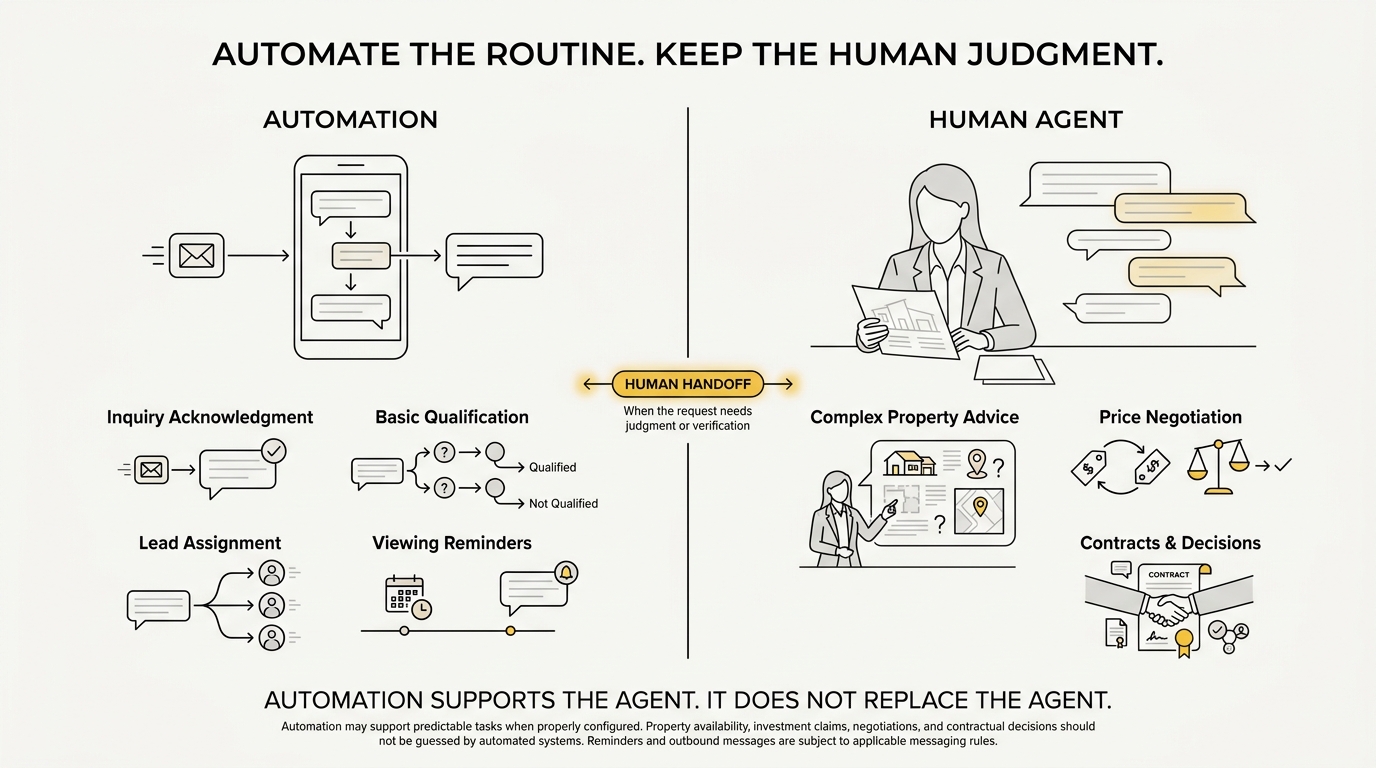
Some property questions need more than a prepared response.
A buyer may want to negotiate a price, discuss investment risks, review contract terms, or confirm whether a particular unit is available.
If the system can’t verify the answer, it should pass the question to an agent. A bot shouldn’t guess about availability, promise investment returns, or give legal advice.
Meta’s WhatsApp Business Messaging Policy also requires businesses using automation during the Platform’s customer service window to provide clear ways for customers to reach human support or another suitable support channel.
Make that option easy to find.
How CRM Integration Supports the Workflow
A CRM helps agents keep track of conversations, especially when several people work on the same property campaign.
Each active lead needs four things: context, an owner, a status, and a next action.
That means recording the inquiry source, property reference, important answers, assigned agent, viewing status, and follow-up date.
After a viewing, for example, an agent might update the lead to Viewed – Follow-Up Required and set a reminder to ask for feedback.
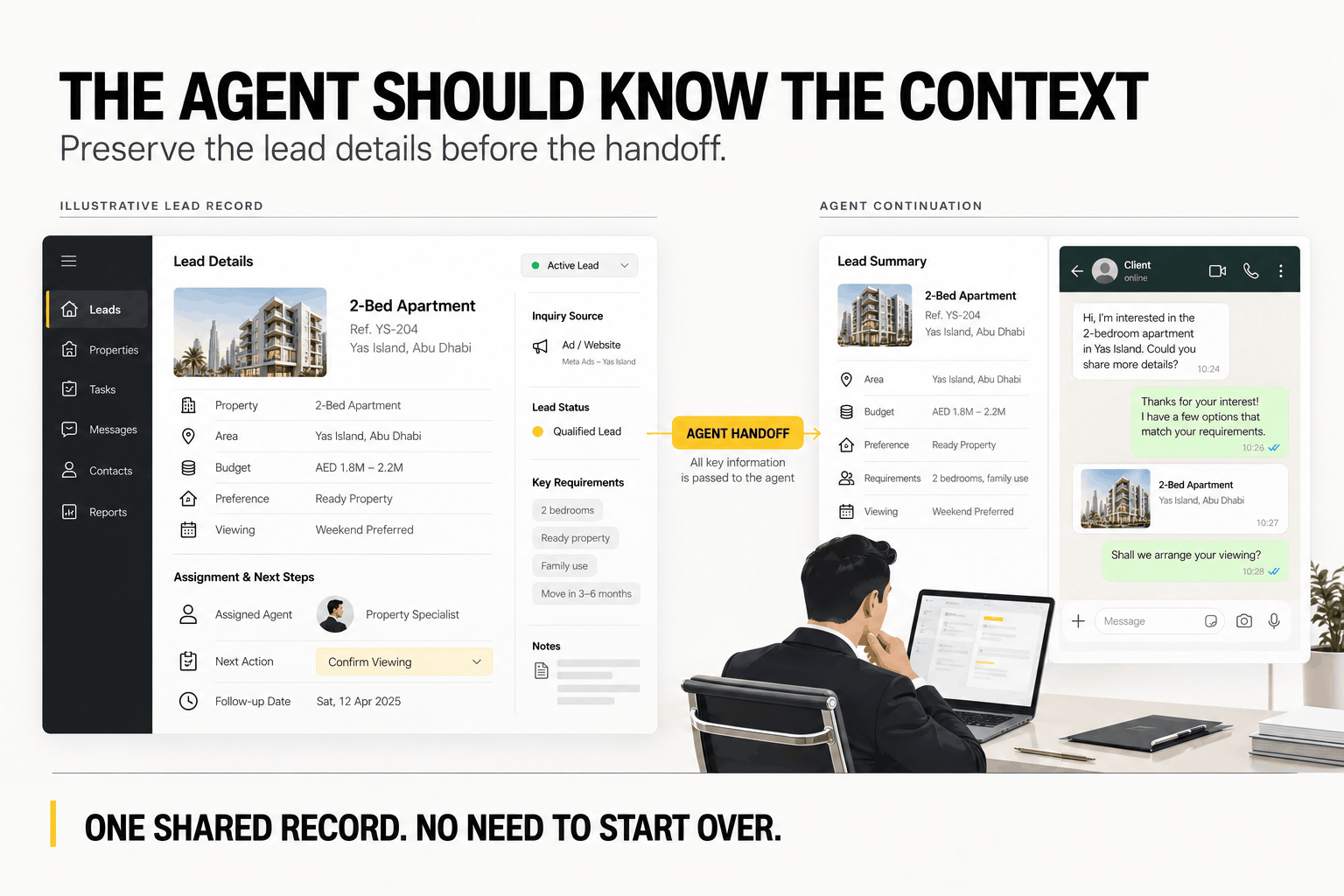
The task stays visible even when the agent is busy with new inquiries.
Keep in mind that a CRM reminder is an internal task. Sending a WhatsApp message afterward still needs to follow the relevant permission and messaging rules.
How to Segment Real Estate Leads for Relevant Follow-Up
Segmenting real estate leads means grouping contacts based on their property needs and where they are in the buying or rental process.
A tenant looking for a ready apartment in Abu Dhabi probably doesn’t want regular updates about off-plan investment projects. Likewise, an investor comparing payment plans may need different information from someone searching for a family home.
Useful ways to group leads include budget, preferred emirate or community, property type, number of bedrooms, buyer or tenant status, investor or end-user, ready versus off-plan, and purchase timeline.
The lead’s current stage matters too. Someone who has just asked about a property needs a different response from someone who has already attended a viewing.
Language preference may also be useful for teams working with buyers from different countries.
The point is to make each message relevant. Ongoing promotions should only go to contacts who can be contacted for that purpose.
WhatsApp Follow-Up and Nurture Examples for Real Estate
Many real estate follow-up messages can use prepared formats. The content still needs to match what the person asked about or agreed to receive.
A viewing reminder, for instance, should focus on the appointment rather than introduce a different property.
| Scenario | Audience | Message purpose | Automation level |
|---|---|---|---|
| New inquiry | New lead | Confirm receipt and ask basic questions | High |
| Viewing confirmation | Buyer or tenant with a booking | Confirm time and meeting details | High |
| Viewing reminder | Scheduled visitor | Remind or offer rescheduling | High |
| Matching property alert | Opted-in lead | Share a suitable listing | Partial |
| New project launch | Relevant opted-in group | Introduce a development | Partial |
| Price or payment-plan change | Interested lead | Share verified updates | Partial |
| Post-viewing follow-up | Viewing attendee | Ask for feedback | Human-led |
| Dormant lead follow-up | Previously interested, opted-in lead | Check whether the search is active | Carefully controlled |
Example: Viewing Confirmation
Hi Sarah, your apartment viewing on Al Reem Island is confirmed for Saturday at 11:00 AM. Your agent will share the meeting details. Reply here if you need to reschedule.
Example: Matching Property Alert
Hi Ahmed, you asked about two-bedroom apartments on Yas Island. We have an updated option within your budget. Would you like the details?
Both messages have a clear purpose and give the buyer an easy way to respond.
These are examples of wording, though, not permission to contact someone. Before setting up automated or business-initiated messages, check the person’s opt-in, the customer service window, and whether an approved template is required.
WhatsApp Marketing Rules UAE Real Estate Teams Should Know
Real estate businesses in the UAE need to follow Meta’s WhatsApp messaging policies and the local laws that apply to their campaigns.
Start with permission. Someone asking about a single apartment hasn’t necessarily agreed to receive future property promotions.
Teams also need a way to handle opt-outs and protect the contact information they collect.
Get Appropriate WhatsApp Opt-In
Meta’s WhatsApp Business Messaging Policy sets opt-in requirements for business contact and requires businesses to honor requests to stop messaging.
Avoid scraped phone numbers or purchased lists without valid marketing permission.
Instead, tell people which business will contact them, what type of messages they’ll receive, and how they can stop those messages.
Keep a record of permission, especially when contact details move between a website form, CRM, and messaging provider.
This helps the team understand what each contact agreed to receive rather than assuming every lead belongs on a promotional list.
Understand Templates and the Customer Service Window
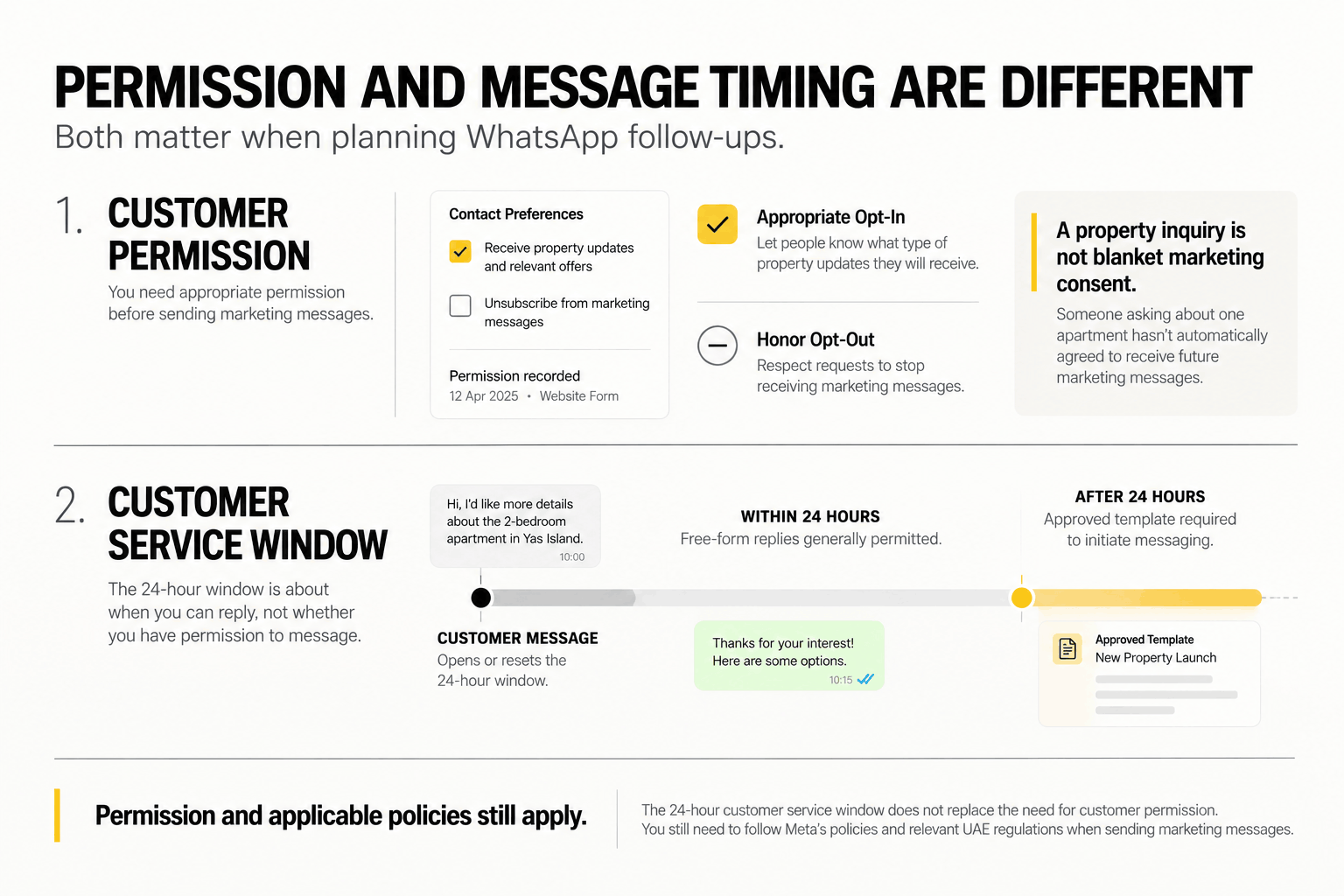
On the WhatsApp Business Platform, a customer’s message opens or resets a 24-hour customer service window.
During that period, businesses can generally respond with free-form messages. After the window closes, business-initiated messages require approved templates.
The template needs to match the message’s purpose and follow Meta’s policies.
For example, an appointment reminder and a promotion for a new property launch may fall under different template categories.
Also, the 24-hour window is a platform messaging rule. It doesn’t replace the need for appropriate permission or compliance with other applicable rules.
Respect Opt-Outs and Handle Lead Data Responsibly
If someone asks to stop receiving promotional messages, update their preferences and stop the relevant outreach.
That change should carry through to the CRM and any connected messaging tools. Otherwise, an old campaign list could keep sending messages after the person has opted out.
Real estate teams also collect personal details such as phone numbers, budgets, property preferences, and buying timelines.
Only collect what you need for the inquiry, and review who has access to that information, how long it’s kept, and where it’s shared.
The UAE’s data protection framework includes Federal Decree-Law No. 45 of 2021 on personal data protection. The requirements that apply depend on the business and how it handles personal information.
UAE telemarketing considerations
Cabinet Resolution No. 56 of 2024 focuses on telemarketing and includes marketing messages through social media applications in its definition.
Businesses therefore shouldn’t assume WhatsApp promotions automatically fall outside its scope.
At the same time, rules written specifically for marketing calls shouldn’t be applied to every WhatsApp conversation without reviewing the relevant provisions.
Before launching a campaign, have a qualified UAE legal or compliance adviser review the messaging practices that apply to your business.
How to Measure WhatsApp Marketing for Real Estate
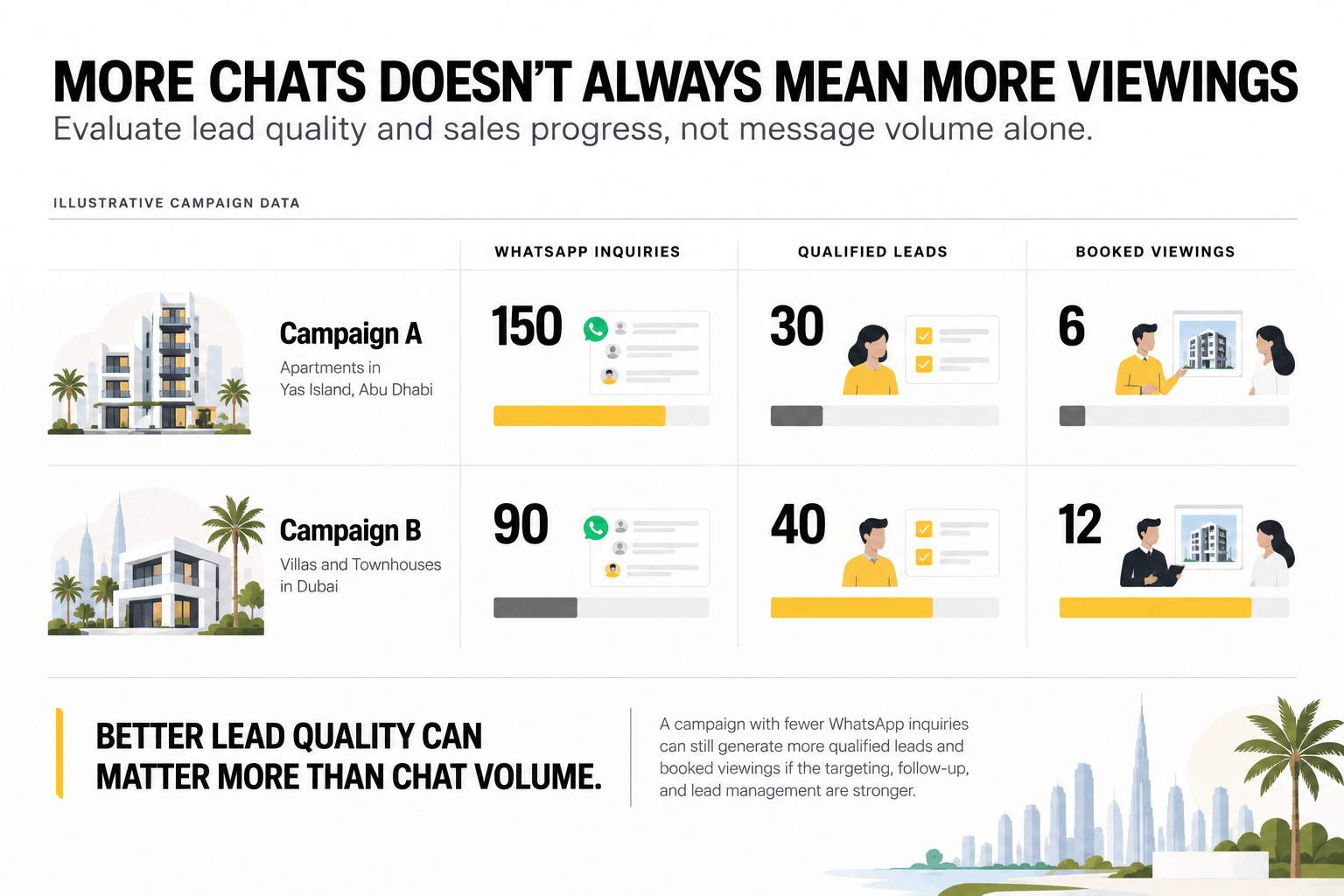
The number of WhatsApp conversations tells you how many chats started. It doesn’t tell you how many became serious property inquiries.
For a better picture, track what happens after the first message. Did the lead meet your qualification criteria? Was an agent assigned? Did the buyer book a viewing?
Those steps show whether your process is moving leads forward.
| Metric | What it measures | Why it matters |
|---|---|---|
| Inquiries by source | Leads from ads, listings, or websites | Shows where interest starts |
| Qualified lead rate | Qualified leads ÷ leads assessed | Shows whether leads fit your criteria |
| Agent handoff rate | Successful handoffs ÷ leads needing an agent | Shows whether routing works |
| Viewing bookings | Confirmed appointments | Tracks movement toward a viewing |
| Lead-to-viewing conversion | Leads booking viewings ÷ relevant leads | Shows how inquiries progress |
| Cost per qualified lead | Paid campaign spend ÷ attributed qualified leads | Helps assess ad costs |
| Opt-out rate | Opt-outs ÷ recipients of relevant outreach | Flags unwanted or irrelevant messaging |
Before reporting, agree on what counts as a qualified lead.
For one agency, that may mean someone with a clear property requirement, a workable budget, and a realistic purchase timeline. Another business may need different criteria.
Whatever definition you choose, use it consistently across campaigns.
If your CRM tracks viewing attendance, later sales discussions, and closed deals, include those results as well. A campaign generating fewer chats may still bring in more qualified prospects.
Common WhatsApp Real Estate Marketing Mistakes
Most WhatsApp marketing problems come from fairly ordinary gaps in the sales process. A lead doesn’t get assigned, an agent loses the listing details, or someone sends a follow-up that has little to do with the original inquiry.
Watch for these mistakes:
- Messaging people without permission. A phone number alone doesn’t authorize ongoing promotions.
- Sending every listing to every lead. Recommend properties based on the person’s requirements.
- Losing inquiry details. Keep the original source and property reference when possible.
- Making buyers repeat themselves. Pass earlier answers to the agent taking over.
- Automating difficult conversations. Negotiations and complicated questions need a person.
- Leaving leads unassigned. Every active inquiry should have someone responsible for it.
- Making human help hard to reach. Buyers should have a clear way to speak with an agent.
- Measuring only chat volume. Track qualified leads, viewings, and later sales progress too.
To find these problems, review a sample of real inquiries from the first message to the last recorded action.
Check whether the agent received the property reference, how long the buyer waited for a reply, and whether anyone recorded the next step.
Small gaps like these can leave otherwise promising leads without a useful follow-up.
A Practical WhatsApp Real Estate Workflow to Start With
You don’t need to automate every conversation at once. Start with a single property campaign and get that process working first.
- Capture the lead source. Record whether the inquiry came from an ad, listing, website, or another channel.
- Save the property details. Keep the listing or project reference when available.
- Ask a few relevant questions. Confirm the person’s budget, requirements, and timeline without repeating what you already know.
- Automate routine steps. Begin with first replies, lead assignment, and eligible reminders.
- Assign the right agent. Make sure the agent receives the information already collected.
- Update the CRM. Record the viewing status, follow-up date, and outcome.
- Review the results. Check qualified leads, agent handoffs, and viewing bookings before expanding.
Then test the situations that don’t follow the expected path.
A buyer might ask something the bot can’t answer, request an agent immediately, reschedule a viewing, or ask to stop receiving messages.
Make sure each situation has a clear next step before using the workflow across more projects.
Frequently Asked Questions
Is WhatsApp marketing useful for real estate businesses in the UAE?
Yes. WhatsApp helps buyers and tenants ask about properties, receive relevant information, and arrange viewings. It works best when the business has a clear process for assigning inquiries and following up, so interested leads don’t sit unanswered.
How do you create a WhatsApp marketing strategy for real estate?
Start by identifying where your leads come from and what should happen after the first inquiry. Decide which questions to ask, who should handle each lead, and when follow-up is needed. Use a CRM or lead tracker to record those steps, then measure qualified leads and viewing bookings.
Can real estate lead follow-up be automated on WhatsApp?
Yes. Depending on the setup, real estate teams can automate first replies, basic questions, lead routing, and eligible appointment reminders. More complicated conversations should go to an agent. Automated messages must also follow Meta’s policies and applicable laws.
Do real estate agencies need the WhatsApp Business API?
Not necessarily. Individual agents and smaller teams may find the WhatsApp Business app enough for everyday messaging. The WhatsApp Business Platform, often called the API, is more suitable when an agency needs supported CRM integrations, team workflows, or advanced automation.
Can Meta Ads send property leads directly to WhatsApp?
Yes. Facebook and Instagram Click-to-WhatsApp Ads can open a business conversation when someone taps an ad. The campaign or property details available in your CRM will depend on the integration and tracking setup.
Do property leads need to opt in to receive WhatsApp marketing?
Businesses need appropriate permission for business-initiated WhatsApp contact and must follow relevant platform policies and laws. Asking about one property doesn’t automatically authorize ongoing promotional messages. Explain what people are agreeing to receive, keep permission records, and honor opt-out requests.
Build a Better WhatsApp Follow-Up System for Your Property Leads
Getting a property inquiry is one part of the job. The next challenge is making sure the right agent receives it, has the information they need, and follows up at the right time.
The Creatives 360 can help real estate businesses plan WhatsApp lead conversations, follow-up workflows, messaging automation, and Meta integrations.
Whether you’re managing inquiries for one development or several projects, the goal is to keep each lead organized from the first message to the next sales step.